Blog

What Is the Best Laser Equipment for Your Business?

Choosing Laser Equipment for a business starts with the work you need to do, not the machine with the highest power rating. A sign shop cutting acrylic has different needs from a workshop marking metal parts or a studio engraving wood. The material, product size, production volume, and required finish all shape the right choice.

There is no universal winner. Not even close. A compact machine may suit a small workspace, while steady production could require a larger working area, faster operation, or automation. Compare the laser source and its compatibility with your materials, but also examine ventilation, installation needs, maintenance access, and available operator training. These details can affect daily work as much as the advertised specifications.

Ask suppliers for clear technical information, sample results on your materials, and realistic details about service and replacement parts. If possible, test a representative job before committing. A polished demonstration is useful, but it may not reflect your actual workload. That distinction deserves attention.

This guide explores the main equipment types and the practical questions businesses can use to compare them. It also considers budget, workflow, and support after purchase. The process can feel less tidy than a simple feature checklist. That is normal. A careful decision weighs today’s needs against likely growth, while leaving room to revise assumptions when real production begins.
What Is the Best Laser Equipment for Your Business?

How Laser Equipment Works and Where Businesses Use It

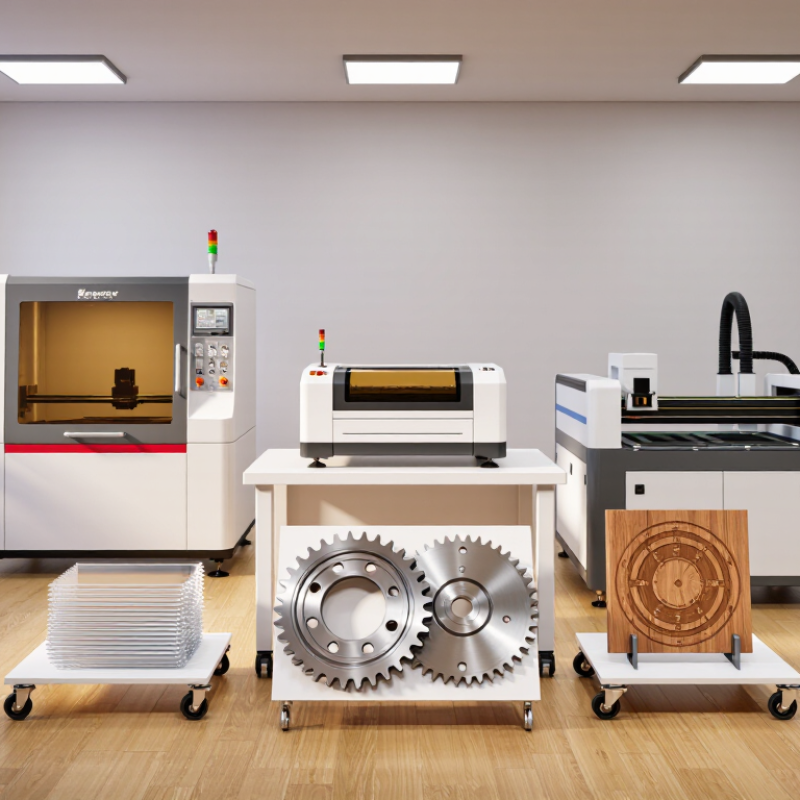
Laser equipment concentrates light into a narrow beam that heats, melts, or removes material. The workpiece absorbs this energy, while lenses and motion controls guide the beam along a programmed path. Different laser sources suit different materials and tasks. Cutting, engraving, marking, and welding are common processes.

In a sign shop, a laser may cut acrylic letters or engrave wooden panels. Manufacturers use laser systems to mark serial numbers on metal parts, while workshops may cut fabric or shape thin sheet materials. The right setup depends on material, thickness, production volume, and required edge quality. Small details count. A clean sample can mislead if it was made slowly or on a different material.

Before choosing equipment, businesses should test representative materials and inspect the result, including the underside and cut edges. Check working area, speed, maintenance needs, operator training, and compatible ventilation. Smoke and fine particles can affect air quality, so extraction and suitable safety enclosures matter. Not every material is appropriate for every laser. That matters. A trial run may reveal uneven engraving, heat marks, or slower output than expected, so leave room to revise the process.

What Types of Laser Equipment Are Available?

Laser equipment comes in several forms, and each suits different materials and workloads. CO2 lasers are commonly used for cutting or engraving wood, acrylic, paper, and some fabrics. A shop making signs may use one to cut clean acrylic letters, but it should not assume the same machine can process every plastic safely.

Fiber lasers are often selected for marking metals and, in higher-powered configurations, cutting sheet metal. They are not interchangeable: a compact marking system may engrave serial numbers but cannot cut thick steel. Diode lasers can handle lighter engraving jobs on materials such as wood and coated surfaces. UV lasers produce less heat in many marking tasks, which can help with delicate plastics or glass. Results still depend on the material and setup.

There is no perfect shortlist. I would not choose by wattage alone; that shortcut can mislead. Compare the work area, expected daily run time, compatible materials, ventilation needs, and maintenance access. Ask for a sample made with your actual material, then inspect its edges and finish. An enclosure and suitable fume extraction matter, too. One detail is easy to overlook: staff need practical training, not just a machine manual.

How to Match Laser Technology to Business Needs

Choosing laser equipment starts with the materials and products your business actually handles. CO2 systems are often suited to wood, acrylic, paper, and some fabrics. Fiber lasers are commonly used for marking or cutting metal. Diode systems can suit lighter, smaller jobs, but may be too slow for regular production. Material thickness, finish, and required edge quality all matter. A sample test beats guessing.

Next, match machine capacity to your workflow. Measure your largest workpiece, then check the usable bed area—not just the advertised dimensions. Estimate daily production and compare it with the machine’s speed and duty cycle. Power alone is not a reliable shortcut. A useful test is to run the same sample at your intended settings and inspect the cut, mark, and cycle time. Small details count. Plan for ventilation, an appropriate enclosure, and clear operator training.

The purchase price is only part of the cost. Include extraction equipment, maintenance, consumables, software, and staff time. Ask how routine servicing works and whether replacement parts are readily available. If possible, visit a working installation and watch a full job, including setup and cleanup. I would not treat any specification sheet as a promise of production output; real materials vary, and estimates can be optimistic. A little caution now may prevent an expensive mismatch later.

Which Factors Determine Equipment Performance and Cost?

Choosing laser equipment is less about chasing the highest power rating and more about matching the machine to daily work. A workshop cutting thin sheet metal may need a different setup from a studio engraving wood or marking parts. Material type, thickness, and the finish you expect all affect performance. Ask suppliers to test your own samples, not just show polished demonstration pieces.

Power matters, but it is only one factor. Beam quality, motion accuracy, cooling, and software controls influence speed and consistency. A small shift in focus can leave a rough edge or a faint mark. Small details matter. Check how quickly the machine handles repeated jobs, and whether its work area fits your largest common item. A machine that runs well for ten minutes may behave differently across a full shift.

The purchase price is only part of the cost. Include installation, ventilation, training, electricity, maintenance, and replacement parts in your estimate. Downtime can be expensive, too, especially when production deadlines are tight. I would be cautious about trusting a single quoted production rate; real materials and operator experience can change it. Some trade-offs are unavoidable. A faster machine may cost more upfront, while a cheaper option may require more hands-on adjustment. Compare total operating costs over several years, and leave room for needs you have not fully predicted yet.

How to Select and Maintain the Right Laser Equipment

What Is the Best Laser Equipment for Your Business?

How to Select and Maintain the Right Laser Equipment

Choose equipment around the work, not the biggest power rating. List your materials, thicknesses, daily job volume, and required edge quality. Then compare wavelength, pulse type, work area, and duty cycle. A machine that cuts quickly may still struggle with fine engraving. Fit matters. Check that the enclosure, fume extraction, cooling, and service access suit your actual workspace.

Maintenance deserves equal attention. McKinsey’s 2017 predictive-maintenance analysis estimated that predictive maintenance can reduce maintenance costs by 10–40% and machine downtime by 30–50%. Those figures cover industrial equipment broadly, not laser machines alone, so treat them as context rather than a promise.

Still, a simple maintenance log can reveal patterns: dirty optics, clogged filters, unstable cooling, or gradual alignment changes.

Follow the equipment maker’s service schedule, and record operating hours, faults, and replaced parts. Keep lenses and mirrors clean using approved materials; inspect cables, ventilation, and coolant levels routinely. Train operators to stop and report unusual noise, heat, or cutting marks instead of compensating with extra power.

This is easy to underestimate. Also, maintenance intervals may need adjustment when dust, long shifts, or frequent material changes put extra strain on the system.

Go to Top